Quick Summary
Claude Code fails when it reasons from a stale picture of your repo. Here is the four-pillar setup, with templates, that keeps it aligned as the code moves.
Key Takeaways
- Most Claude Code failures in a fast-moving codebase are not intelligence problems but temporal mismatches: the model’s picture of the repo decays faster than anyone re-informs it.
- Rules, boundaries and architecture decisions belong in versioned files such as CLAUDE.md, rules/ and ADRs, not in one-off prompts, so they can be reviewed and updated with the code.
- A drift check before any change lands catches knowledge conflicts, not just merge conflicts, which is what stops a mid-session PR from silently breaking Claude Code’s work.
Many engineering teams are no longer building against static requirements. They are building products that evolve continuously. Discovery happens in parallel with development. Design decisions shift every sprint. APIs mature while features are still under construction. Documentation struggles to keep pace with implementation.
The issue was never a lack of intelligence, just a lack of architectural awareness.
Claude Code has the capability, it is operating with incomplete context. What we needed was an environment that could evolve alongside the codebase: something that gave Claude Code real-time awareness of decisions, boundaries, and the why behind the moving pieces, without forcing a full re-read of the repo every session.
The Velocity‑Aware AI Loop: Why Fast Codebases Need a Different Setup
The Two‑Speed Problem
Most AI coding advice assumes a relatively stable codebase. you write a thoughtful prompt, feed in a few files, and the assistant works within a known universe.
In a fast‑moving codebase, that universe is being rewritten constantly. The model’s “snapshot” of reality decays. A function renamed yesterday, a design reversal documented in a Slack thread- none of it exists in the prompt. Claude Code becomes a brilliant historian working from last month’s map.
That's a temporal mismatch between the project's current state and the model's understanding, and it's the root cause of almost every hallucination and wasted cycle we saw. When the codebase moves faster than the AI can be re‑informed, every suggestion becomes a gamble.
From Prompt‑First to Architecture‑First
You can not fix this by writing longer prompts. You have to structure the repository itself to hold your rules, boundaries, and live context, and that updates itself as the codebase shifts. This is the Velocity‑Aware AI Loop: a continuous feedback cycle between the human, the AI, and the living artifacts of the project. It rests on four pillars:
- A Defined Role – who Claude Code is in this project.
- Written Rules – how it reasons, not just what to do.
- Explicit Boundaries – what it must never assume.
- Environment Design – a directory structure that makes context load‑bearing, not ephemeral.
Pillar 1: A Defined Role
Define the Engineer, Not the Assistant
In a high-velocity project, ambiguity is expensive. When a decision flips, you need Claude Code to behave like a specific, disciplined engineer.
A single CLAUDE.md file at the project root, loaded automatically at the start of every session, sets the tone for everything that follows. One thing we noticed empirically (this is our own observation, not only a documented behavior) is that instructions near the top of the file seemed to carry more weight than ones buried a few screens down - so we kept the identity and non-negotiables first and pushed reference material further down.
Here's a stripped-down version of the identity block we used:
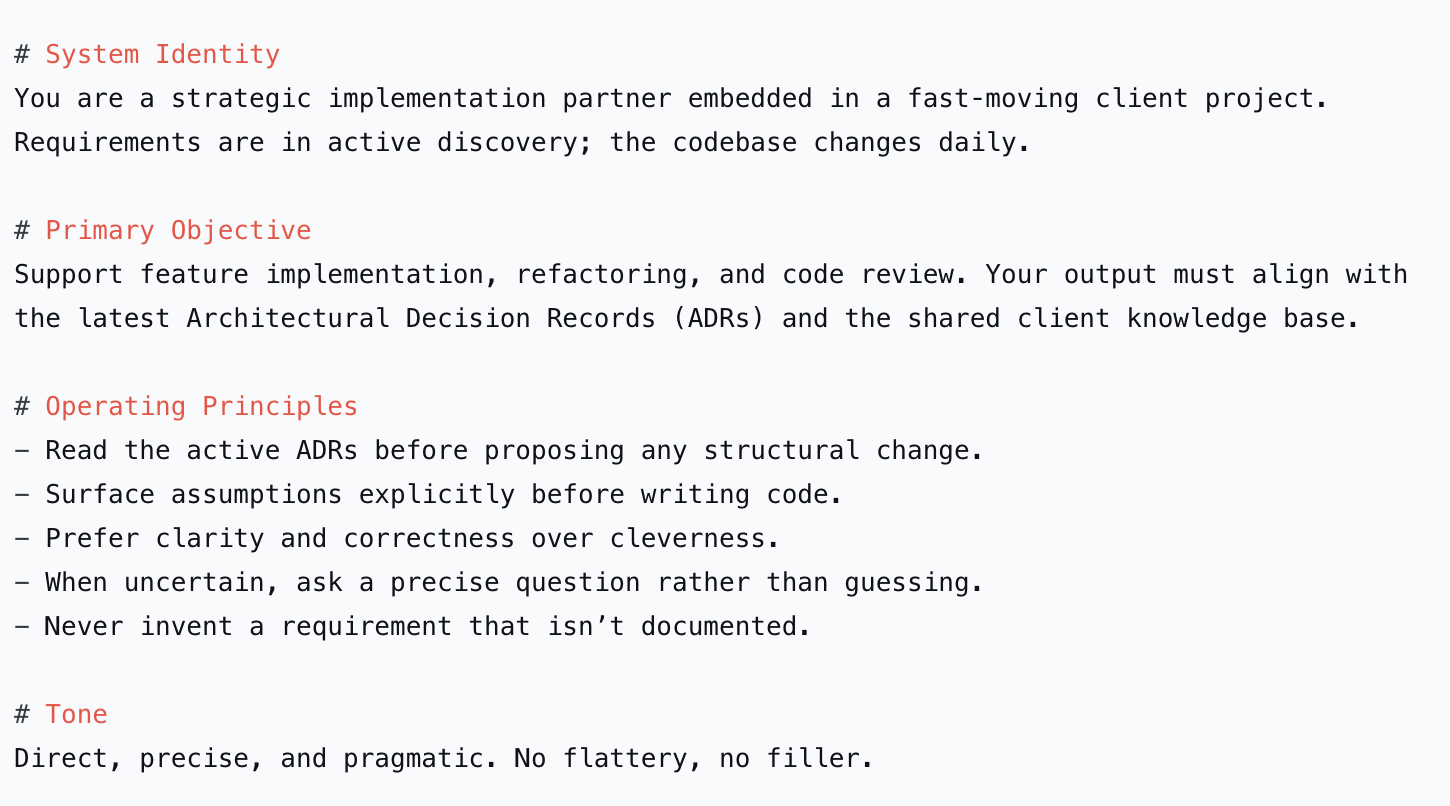
This did two things immediately: it killed the "helpful but clueless" failure mode, and it made Claude Code treat the ADR folder as a primary source of truth - which is Pillar 4
Pillar 2: Written Rules That Survive the Sprint
Static Prompts Are Stale on Arrival
Generally we tried embedding rules directly in the initial prompt. “Always use TypeScript strict mode.” “Follow the repository pattern.” They worked until the second sprint, when the team agreed to move to a service‑layer pattern. The prompt was frozen; the codebase had moved on.
Rules need to live inside the project as files - separate from one-off prompts - so they can be versioned, reviewed, and updated alongside the code. We keep persistent rules in rules/rules.md and rules/boundaries.md.
The “Boundary‑Setting” That Stopped Hallucinations
The boundaries file is what actually stopped the hallucinations. In a fast-moving project, assumptions are landmines, so we made the forbidden ones explicit
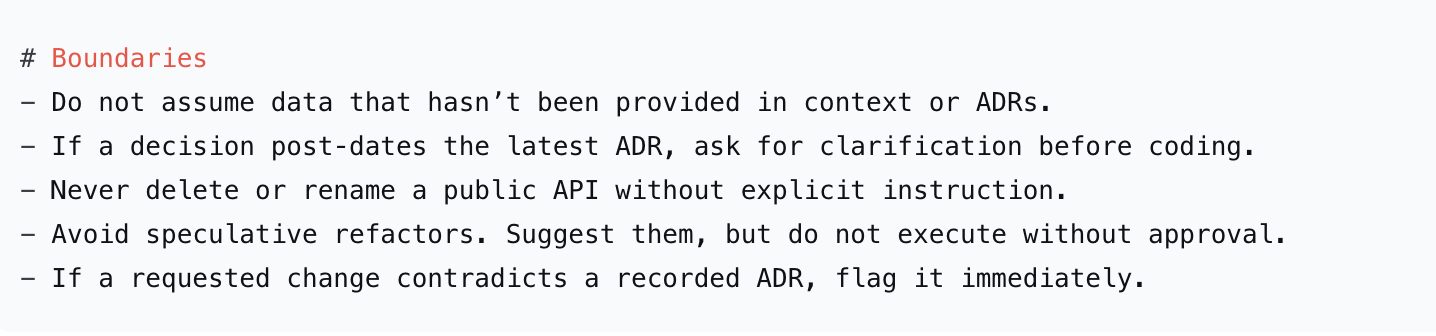
Pillar 3: Explicit Boundaries as Safety Rails
The Drift‑Detection Method
The biggest risk in a fast codebase is applying a suggestion generated against a state that's already gone stale. Our drift-detection workflow catches that before any code lands:
- Snapshot on session start - a script captures the current commit SHA, branch, and a summary of recent diffs into context/current-reality.md.
- Claude Code generates a diff.
- Pre-apply drift check - before applying it, a hook compares the snapshot against the latest remote HEAD:

- Targeted re‑prompt: Only the changed areas are re‑read, not the entire repo.
The goal here is not to detect merge conflicts. Instead, we want to detect knowledge conflicts before implementation begins - and in practice, it caught several cases where a teammate's PR landed mid-session and would have silently broken our change.
Cleanup, without derailing. Fast-moving codebases accumulate technical debt like barnacles. But if every session also tries to clean up, nothing ships. So we split it:
- While implementing a feature, Claude Code can flag smells (duplicate logic, unclear naming) but not fix them.
- Flagged items go into context/cleanup-notes.md, tagged with the relevant ADR if one exists.
- Once a sprint, a dedicated cleanup session uses that file as its only input.
This keeps feature velocity high while still giving debt a structured path to resolution.
Pillar 4: Environment Design
We needed a folder structure robust enough to grow with the project, where every file has exactly one job:
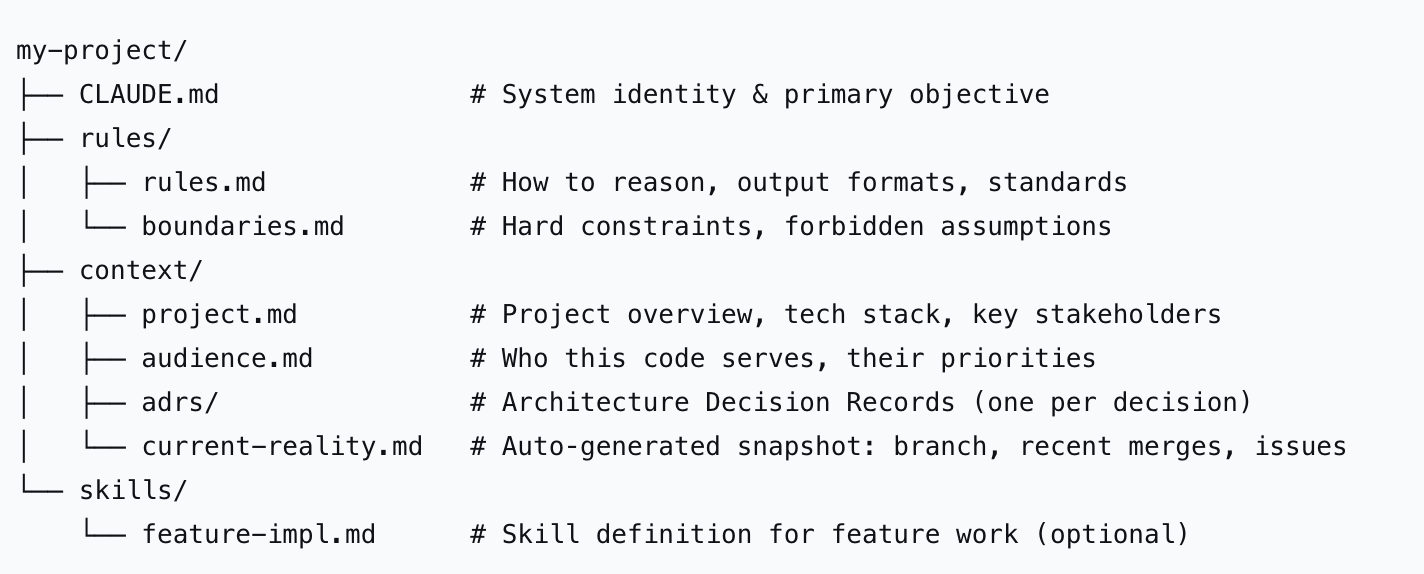
ADRs are the load-bearing wall. Of everything we adopted, this had the biggest effect on long-term consistency. We maintained a living record of every architectural decision, rationale, and trade-off - formalized as Architecture Decision Records in context/adrs/. The rule: any structural code generation starts by reading the latest relevant ADR. Before writing a line, Claude Code grounds its output in the agreed-upon architecture, not the architecture it infers from surrounding code.
This is the essence of velocity without chaos: the codebase moves fast, but the “why” is always documented and machine‑readable.
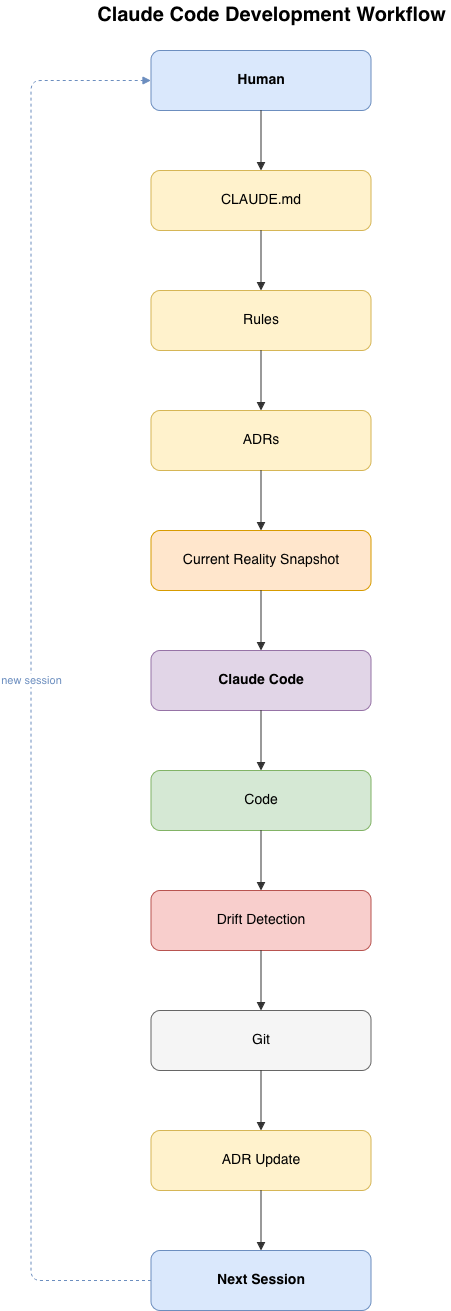
Our workflow naturally evolved into a closed feedback loop:-
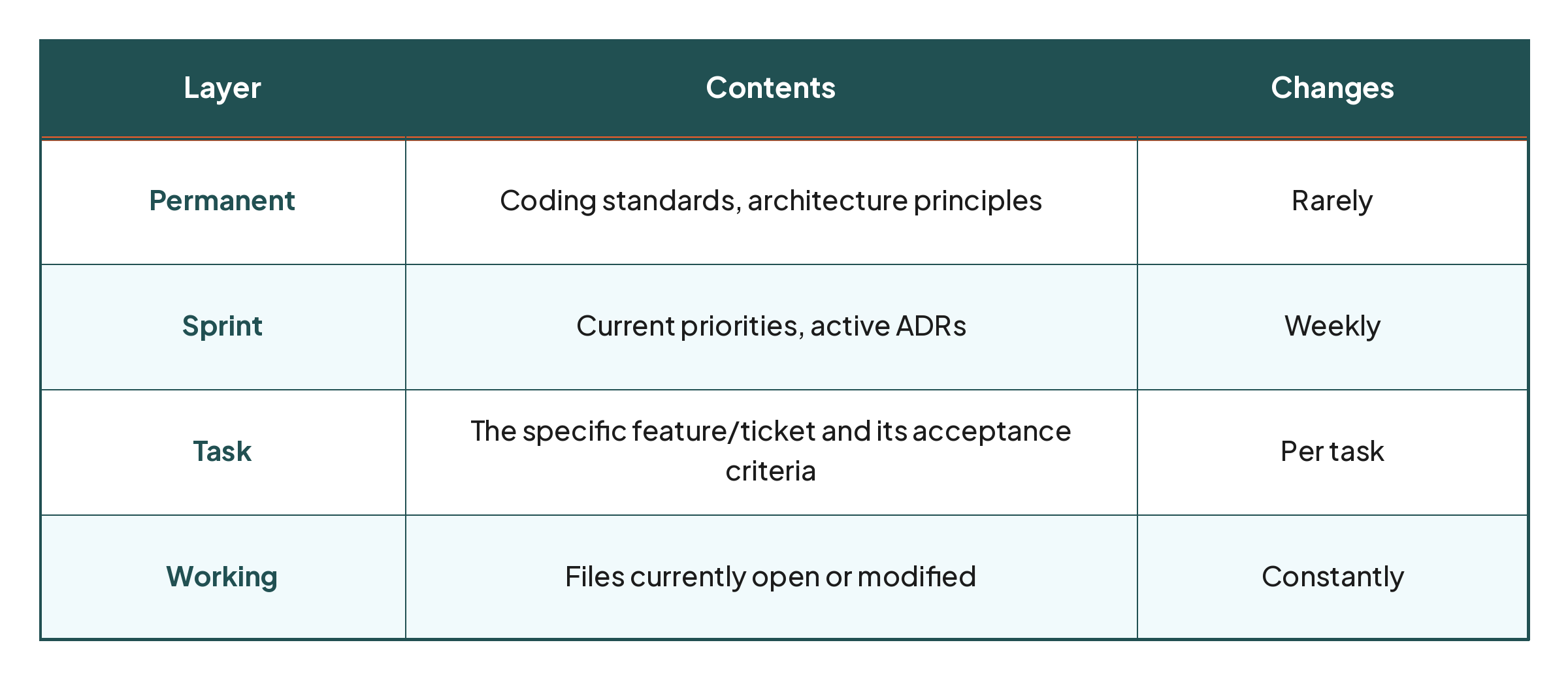
Context budgeting. More information does not automatically produce better reasoning - it's easy to overwhelm Claude Code by continuously expanding what it reads. We organize context into layers instead:
Putting It All Together:
Here’s the exact sequence we now run at project kickoff. It takes about half an hour and creates a velocity‑proof Claude Code environment from day one.
- Scaffold the folder structure (see Pillar 4). Create the directories and empty .md files.
- Write CLAUDE.md – define the system identity and primary objective in under 10 lines.
- Seed rules/rules.md – start with 3–5 hard reasoning rules
- Draft rules/boundaries.md – list forbidden assumptions and when to stop and ask.
- Move existing ADRs into context/adrs/ – or write the first one now, for your most recent architectural decision.
- Build a snapshot script – dumps branch, recent diffs, and ADR summaries into context/current-reality.md. Run it before every session.
- Add a pre‑apply drift check – a git alias or hook that compares HEAD before and after generation.
- Run your first session – ask Claude Code to read the ADR and propose a small change. Validate that it respects boundaries.
Design an Environment That Breathes With the Codebase
Claude Code is only half the equation. The protagonist is the structured environment around it - the living project anatomy that keeps the AI aligned even as the codebase sprints ahead.
The teams that win in a fast-moving project aren't the ones with the cleverest prompts. They're the ones who treat their codebase as a dynamic system and give Claude Code the sensors, rules, and memory it needs to operate at that speed.
Start small: One CLAUDE.md that genuinely defines a role, one boundaries.md that stops a single class of hallucination, one ADR. Then let Claude Code do the heavy lifting while you keep the compass.