.avif)
Quick Summary
Key Takeaways
When working with clients, one question I hear again and again is simple but important:
How do we trace the complete journey of our data in Snowflake?
That — in essence — is what Data Lineage is all about. It helps us understand where data originates, how it’s transformed, and where it finally goes. Getting it right builds trust, ensures compliance, and strengthens data governance.
1. Why Data Lineage Matters
Data lineage isn’t just a technical nice-to-have — it’s a governance must. Here’s why every organization should care:
- Compliance – Essential for meeting GDPR, audit, and industry regulations.
- Transparency – See the real data sources behind dashboards and reports.
- Trust – Provide confidence to business users that data is accurate and complete.
- Optimization – Reveal redundant tables, joins, or ETL steps that slow down performance.
2. Building Blocks for Data Lineage in Snowflake
While Snowflake doesn’t yet have a built-in, fully visual lineage interface, it provides several built-in views and functions that get you most of the way there:
- ACCOUNT_USAGE.ACCESS_HISTORY → Tracks which tables and views were accessed by which queries.
- ACCOUNT_USAGE.QUERY_HISTORY → Captures query details, enabling you to follow transformation steps.
- ACCOUNT_USAGE.OBJECT_DEPENDENCIES → Maps how different objects (tables, views, etc.) depend on each other.
- External tools – Integrate with platforms like Collibra, Atlan, Alation, or dbt for advanced cataloging and visualization.
3. Example: Tracking Access to a Sensitive Table
Need to know who recently accessed your CUSTOMERS table? Run this:
.avif)
You’ll get a quick list of users, their queries, and timestamps — perfect for security reviews and audits.
4. Finding Object Dependencies
To understand which downstream objects rely on a given base table, use this:
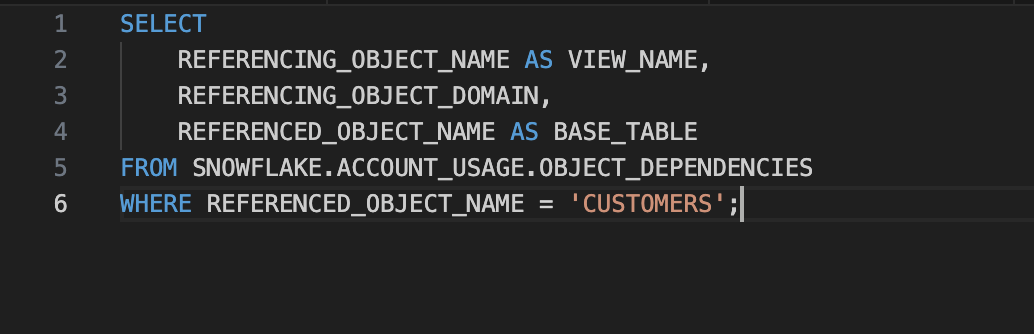
This helps you determine the ripple effects of schema or model changes across your ecosystem.
5. Tracking Data Flows Using ACCESS_HISTORY
If you want to see what specific queries touched certain objects, try this:
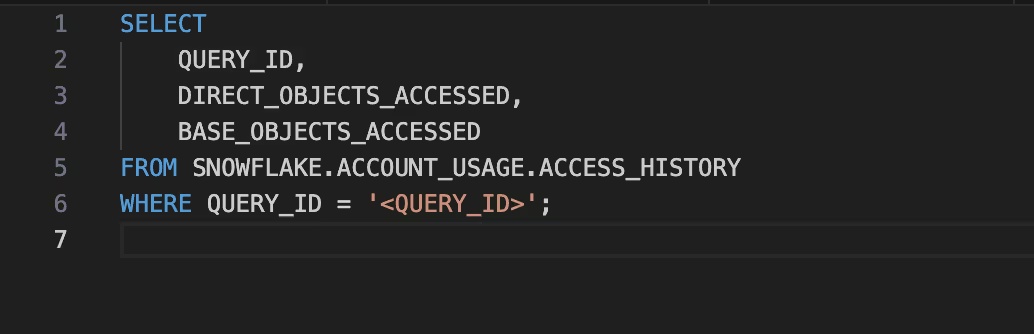
It’s a great way to connect the dots between query activity and the objects involved.
6. Automating Lineage at Scale
Once you’ve tested these queries, the next step is automation. You can:
- Build consolidated lineage views using ACCESS_HISTORY + OBJECT_DEPENDENCIES.
- Feed this metadata into a data catalog (like Collibra, Atlan, or Alation).
- Integrate Snowflake with dbt Cloud to automatically produce lineage graphs and model maps.
The Payoff
Implementing lineage in Snowflake pays off big time:
- Cuts down audit and compliance overhead.
- Makes impact analysis faster during data model changes.
- Builds organizational confidence in your data assets.
- Reduces costs by identifying unused datasets and transformations.
In short: Snowflake’s native metadata views give you the foundation for robust, automated data lineage. Once integrated with cataloging tools, you gain full visibility into your data’s lifecycle — reliable, transparent, and audit-ready.